Showing posts with label Pre Liminary Task. Show all posts

Saturday, 15 October 2016

Music Video: Review

After watching our Pre-Lim music video, we decided to pick out each part of it that we liked and come up with some aspects of the video that we would improve if we were to redo the task.
Aspects we liked included:

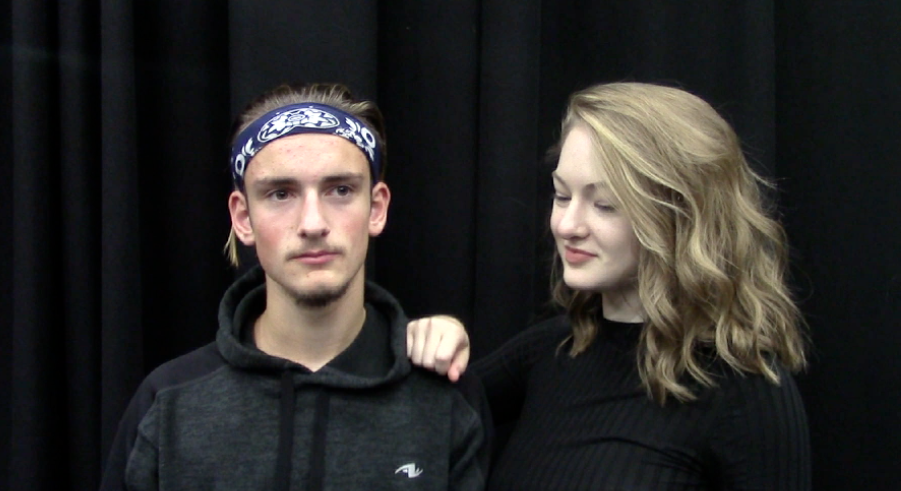
  • We really loved the camera angles and shots we had used in our music video, especially this particular shot as it added real visual aesthetics for our audiences and was different to most conventional shots used in music videos. 

  • We really like the choice of using black and white filter in each piece of our footage for our music video as it gave the actual shot additional visual aesthetic appeal for our audience.
  • We also really liked our choice of song as it gave our actors a lot to work with and decide on a particular story line/choreography. It also influenced the on screen chemistry between the actors so they weren't coming across awkward during their specific sections of the music video they featured in together.
Aspects we'd improve if we were to recreate the video would be:
  • We realised once we had completed our music video that the initial starts almost to abruptly causing our actress to look slightly rushed and unsteady. We would change this by starting the shot with a fade from black into our first shot of our actress.

  • We decided after analysing our video very closely that the actors lip syncing could be slightly more exaggerated in order for the lyrics of the song to be emphasised. 


Friday, 14 October 2016

Wednesday, 5 October 2016

Music Video: Organising Our Footage Pt 2

Once we had all of our footage in the right order in which would be chronological to the music, we then started to think about what kind of visual effects we wanted on our video e.g. black and white, slow motion, and whether we wanted any transitions between each section of the music video. We had already previously decided to go with a complete black and white video and keeping everything within the music video looking monochromatic, therefore, we changed every part of our footage into black and white using Clip Adjustments.


We decided not to use any kind of transitions to connect our footage as we wanted it to look snappy and quick because the song is a very upbeat, snappy, pop genre. We did decide to speed up some parts of our footage in order for it, either, to fit in time with a certain part of the song and/or to overall create interesting visual effects for the audience.


We also had to mute each one of our clips so that we (the audience) couldn't hear any background sounds while playing the music track over the top.


Once we had muted each clip, we then inserted our specific track (Problem by Ariana Grande ft Iggy Azalea) and cut it down in order for it to match up perfectly with the lip syncing by our actors seen in each part of our footage.


After we had perfected each piece of film for our 30+second music video, we then added a few bloopers at the end for our audiences to get a look into exactly how some of the recording process went and how we progressed in order to create a professional looking piece of footage.


Music Video: Organising Our Footage Pt 1

We put all of the footage we filmed onto one computer and transferred it all into iMovie. As we had quite a lot of footage, we decided to initially discard any footage we knew we wouldn't use for the finished product e.g. practice shots, footage of incorrect costume, first attempts at lip syncing.

We then watched each piece of our footage we had left to use and came up with a good idea of the order in which we'd play them in to match up with where our chosen song would begin and end. This was done so that we could then put those specific pieces of footage into a real on iMovie and begin our editing process also.


Tuesday, 27 September 2016

Music Video Planning: Costume

Our two actors will be wearing all black for our music video as we want to present a monochromatic and visually aesthetic look. This also means that at times the actors costumes will blend into the backdrop and then at some points, stand out. This is intentional as we believe it will add our own visual effects to the video before putting the footage into iMovie and begin editing.

Danny and myself will be wearing a black t shirt, black jeans and black shoes.


Sunday, 25 September 2016

Music Video: Filming Days

We've decided to use three days to do our filming for the music video. One of these days will be used specifically for our first attempts at lip syncing, general movement and figuring out exactly what kind of camera shots to use for various parts of the music video. The three dates will be:
28th September 2016- Lip Syncing, Movement, Camera Shots
30th September 2016
4th October 2016
We decided to use these dates in order to get the filming done as quickly as possible, but at the same time, using our time effectively to ensure we get the best quality footage we can, and so we won't be postponing any important steps in the process that can't be rushed later on down the line.


Music Video Planning: Location

For our music video, we have all decided that we will be using specific locations around school to film, as they are perfectly suitable for the backgrounds that we desire within our video. These locations include our Drama studio, a plain white wall and a two toned wall. We will also be using a projector that is located in one of our art classroom's in order to project certain patterns on to the actors faces during parts of our footage.

Drama Studio
We have chosen to film in the drama studio as there is a large black curtain there that will be perfect for a background during specific parts of filming as we want a very minimalistic feel to the video.


White and Two toned Wall
The decision to use these very plain backdrops is to also capture the minimalistic feel we want for our video as our actors (Myself (Holly) and Danny) will be doing specific movements and interacting with each other and we don't want anything to take away from the focus on them.


Projection Pattern